
App discovery now happens across App Stores, search engines, and AI LLMs. Reviews play a central role in how apps are understood, ranked, and recommended. As discovery becomes more language-driven, aligning your app’s public messaging with real user language is increasingly critical.
Appbot helps teams analyze review language at scale so they can align App Store copy, keywords, and messaging with how users actually describe their app.
This support article explains how to use Appbot’s review analysis features to support App Store Optimization (ASO), Search Engine Optimization (SEO), and AI-driven discovery.
How Reviews Influence ASO, SEO, and AI App Discovery
Reviews are one of the richest sources of natural language about your app. Users describe:
- Problems they are trying to solve
- Features they rely on
- Use cases and workflows
- Comparisons to alternatives
Search engines, app stores, and AI systems all use this language as a signal to understand relevance and intent. Appbot helps you extract and organize these signals so they can be applied consistently across your App Store presence and broader discovery surfaces.
Text Analysis for ASO and SEO
Text analysis examines the language used across reviews to identify recurring terms and expressions, helping teams understand how users naturally describe the app and its value.
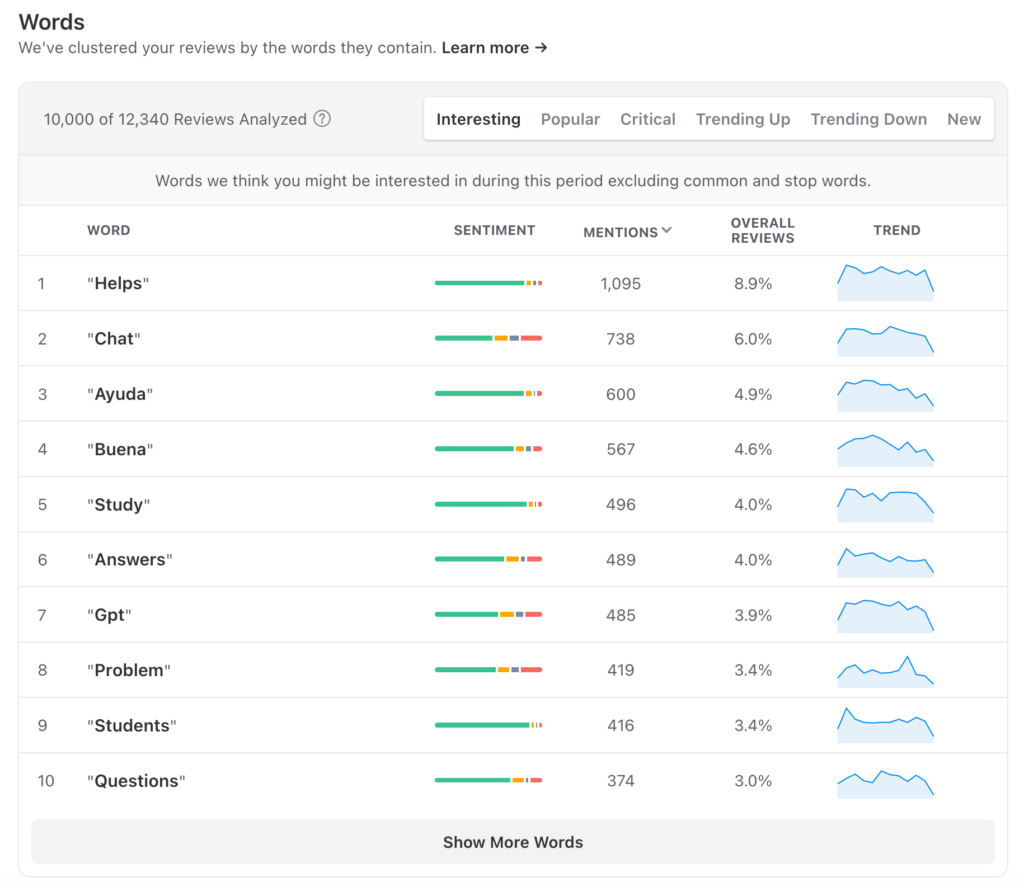
Appbot’s built-in Words & Phrases analysis automatically extracts the most common words and phrases from your app reviews, making it easy to understand customer language across thousands of reviews.
What it shows
Words and phrase analysis highlights the most frequently used terms in your reviews. This includes:
- Feature names
- Common actions or workflows
- Problem statements
- Outcome-focused language
How it helps
This analysis helps teams identify the language users naturally use when describing the app. These words and phrases often differ from internal product or marketing terminology, revealing gaps between how teams describe the app and how users actually experience it.
How to use app reviews for ASO and SEO
- Compare frequent review phrases with your App Store description and subtitle
- Identify gaps where users mention concepts that are missing from your copy
- Validate whether your language reflects how users actually talk about the app
This is especially useful when reviewing or refreshing App Store descriptions, release notes, and web landing pages.
Using Topic Analysis
Topic analysis is a method for organizing large volumes of unstructured text into clear, recurring themes so teams can quickly understand what people are talking about the most.
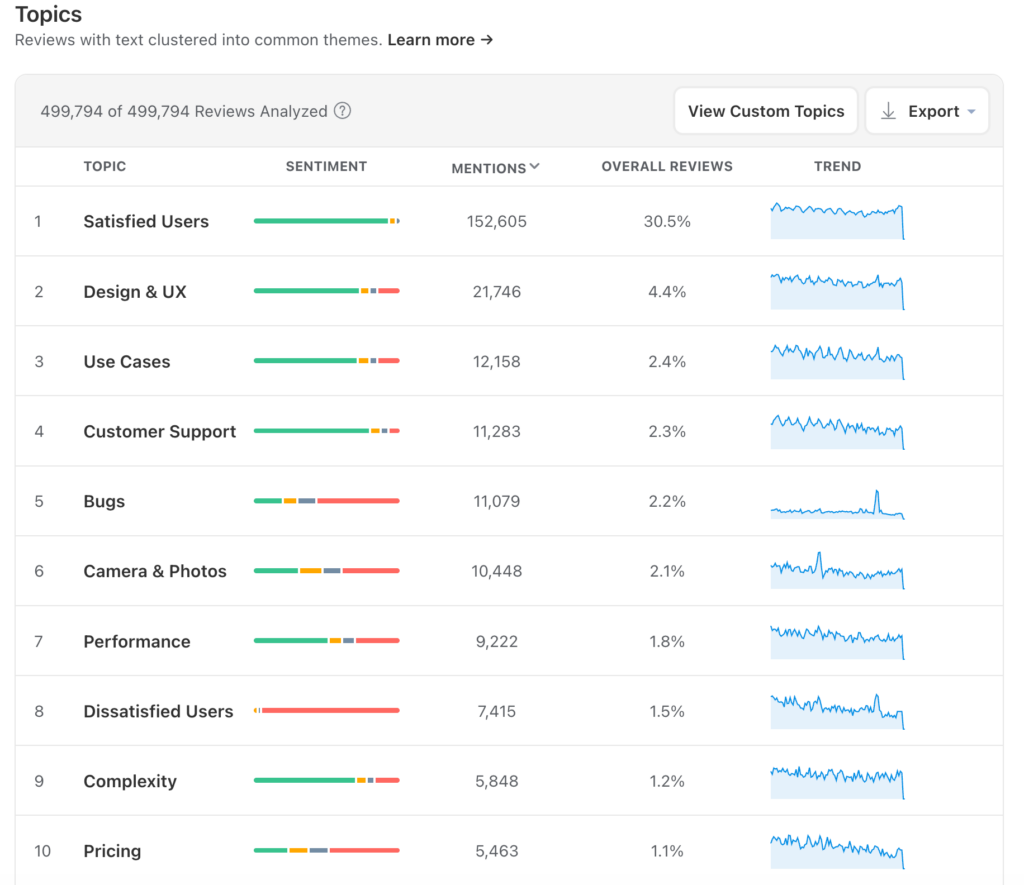
Appbot’s Topic Analysis automatically groups reviews into prebuilt theme categories, making it easy to understand the main topics customers discuss without reading every review individually.
What it shows
Topic analysis groups reviews into themes based on meaning rather than individual words. Topics often represent:
- Core features
- Recurring problems
- Key use cases
- Areas of confusion or friction
How it helps
Topics provide structure to large volumes of feedback. Instead of reading reviews one by one, teams can see which themes dominate, how they trend over time, and where attention may be needed.
How to use it for app discovery optimization
- Identify which use cases matter most to users
- Confirm whether key topics are reflected in App Store copy
- Spot emerging topics that may represent new discovery opportunities
Topic analysis is particularly helpful when aligning App Store messaging with real user needs rather than assumed value propositions.
Using Custom Topics
While prebuilt topics cover common review themes, custom topics let teams create their own categories based on what matters most to their product.
Custom topics allow you to define specific themes using your own keywords and phrases, so reviews are automatically grouped around concepts unique to your app, industry, business model, or roadmap.
What it shows
Custom topics show all reviews that match the keywords and phrases you define for each topic. This includes:
- Reviews mentioning specific features or feature names
- Feedback related to a particular launch or experiment
- Comments about pricing, subscriptions, or plans you care about
- Workflow- or experience-specific feedback (e.g. onboarding, login, sync)
- Topic volume and sentiment over time
Instead of relying on generic categories, custom topics give you a focused view of customer feedback tied directly to your priorities.
How to use Custom Topics for app growth
- Create custom topics for features or use cases you want to monitor closely
- Track how often they appear and in what context
- Use this insight to decide whether and how to surface them in App Store copy or release notes
- Custom topics are especially useful during feature launches, repositioning efforts or strategic shifts.
Using Sentiment Analysis
Sentiment analysis examines the emotional tone of reviews to help teams understand how users feel about different aspects of their app, not just what they mention.
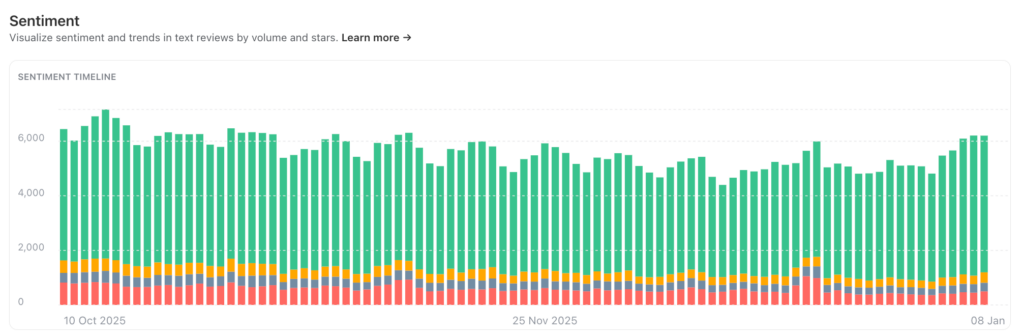
Appbot’s Sentiment Analysis automatically evaluates review sentiment at scale, allowing teams to track how perception changes across features, topics, and releases.
What it shows
Sentiment analysis shows how positive, neutral, or negative user feedback is over time. You can view sentiment:
- Overall across all reviews
- By topic or custom topic
- Before and after releases or major updates
This makes it easier to see where sentiment is improving, declining, or remaining stable.
How it helps
Sentiment adds important context to review volume and topics. It helps teams understand:
- Whether discovery messaging aligns with user expectations
- Which features or use cases generate frustration or delight
- Where negative sentiment may indicate confusion or mis-positioning
Rather than reacting to individual reviews, teams can focus on broader perception trends.
How to use Sentiment it for ASO and SEO
- Monitor sentiment after copy or feature updates
- Identify topics with negative sentiment that may need clearer positioning
- Use positive sentiment to reinforce language that resonates with users
Sentiment provides context, not just volume, helping teams make more confident messaging decisions.
Validating App Store Copy with Review Language
One practical way to use Appbot for discovery optimization is to compare review language directly with App Store descriptions.
A simple approach:
- Review your top words, phrases, and topics in Appbot
- Create your own custom topics to monitor important themes
- Read your App Store description and release notes
- Check whether the same language appears in both
If there is a mismatch, it often indicates an opportunity to improve clarity or relevance.
A useful heuristic:
If an AI assistant cannot understand and explain what your app does in one clear sentence using your App Store copy, the review language alignment may need work.
Review language should be treated as a primary input into discovery copy, not a secondary validation step.
